
Have you ever visited an arcade, tossed a few basketballs into the hoop, and tried to beat the high score? That rush of excitement is exactly why arcade basketball games are so popular. If you are a game developer or a passionate gamer, you might want to bring that fun to mobile phones or web browsers. The easiest way to start is by using Arcade Basketball Scripts.
Using a pre-made game template saves you hundreds of hours of coding. Instead of building the physics and scoring systems from scratch, you can use a ready-made game engine project. Let’s dive into how these development tools work and how you can use them to build an amazing game that players will love.
What Are Arcade Basketball Scripts?
Arcade basketball scripts are collections of code written for game engines like Unity or Unreal Engine. These code files control how the basketball moves, how the hoop detects a score, and how the timer counts down. Think of them as the foundation of your game. Instead of figuring out how to make the ball bounce properly, the script handles the heavy lifting for you. This lets you focus on adding cool graphics, fun sound effects, and unique levels.
Why Use Game Templates for Sports Projects?
Building a game from the ground up takes a lot of time. When you use a sports game template, you get a fully working prototype on day one. You can test the controls instantly, tweak the gravity settings, and see how the game feels. It is a huge time-saver for solo developers and small teams. Plus, it helps you avoid common coding mistakes related to collision detection and physics.
Key Features to Look for in Game Code
When shopping for or downloading a game project, you need to check for specific features. A high-quality template should include a smooth ball throwing mechanic, a reliable timer system, and an accurate scoring trigger. You also want to look for audio manager scripts that play cheering sounds when the ball goes in. Make sure the package includes simple user interface prefabs for your main menu and game-over screens.
Setting Up Your Development Environment
Before you can use your code, you need to install a game engine. Unity is the most popular choice for mobile and web casual games. Download the software, create a new 3D or 2D project, and import your asset package. Open the main game scene to see how the objects are arranged. Take a few minutes to organize your folders so your textures, scripts, and audio files are easy to find.
Understanding the Physics and Movement
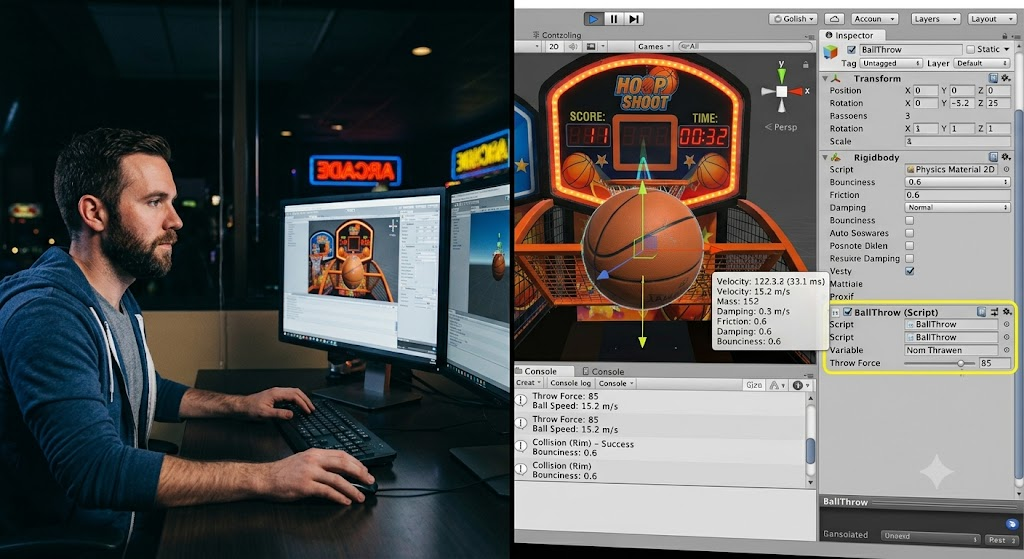
The physics system is the heart of your game. You want the basketball to feel heavy but bouncy. Most templates use raycasting or rigid body physics to calculate the throw. If the ball moves too fast, it will pass right through the hoop collider. If it moves too slow, it will feel clunky. Adjust the force variables in the inspector window until the throwing motion feels completely natural and satisfying.
Customizing the Visuals and Art Style
Once the code works, it is time to make your game look beautiful. Swap out the basic placeholder shapes with detailed 3D models or colorful 2D sprites. Add cool particle effects that burst when the player scores a swish. Good lighting and bright colors will attract players and keep them glued to their screens. Just remember to keep the file sizes small so the game runs smoothly on older mobile devices.
Adding Sound Effects and Music
Sound brings your game to life. You need a swoosh sound for a perfect shot, a buzzer sound when time runs out, and background music to keep the energy high. Import your audio files into the engine and attach them to the correct trigger zones. A quiet game feels boring, but a game with great audio creates an exciting atmosphere that makes players want to play just one more round.
Implementing High Score Systems
Every arcade game needs a leaderboard. You should use a data persistence script to save the highest score locally on the device. When the timer hits zero, the script checks if the current score beats the saved record. If it does, it updates the display. Letting players see their personal bests encourages them to keep practicing and trying to beat their own records.
Testing and Polishing Your Game
Testing is the most important step before publishing. Play your game dozens of times to find bugs or unfair difficulty spikes. Try throwing the ball from every possible angle to ensure the trigger zones work perfectly. Ask your friends to play it and watch how they hold the device and tap the screen. Use their feedback to make the controls smoother and the gameplay much more enjoyable.
Publishing to App Stores and Web
After polishing your game, you are ready to share it with the world. Export your project for Android, iOS, or WebGL depending on your target audience. You will need to create developer accounts, design nice icon art, and write a catchy description for the app store. Once your game is live, tell your friends and family to download it and leave positive reviews to help your ranking.

Frequently Asked Questions
Do I need to know how to code to use these scripts?
Basic knowledge helps, but it is not strictly required. Most templates let you change values like speed and time directly in the editor without rewriting code.
Can I publish games made with these templates?
Yes, you can. However, you should always check the specific license agreement of your asset package to ensure commercial use is fully permitted.
Which game engine is best for arcade sports games?
Unity is highly recommended because of its massive asset store, simple C# coding language, and excellent cross-platform support for mobile devices.
How do I make the basketball throw feel natural?
You can adjust the force vector and gravity scale in the inspector. Tweak these numbers in small steps until the throw arc looks realistic.
Can I add online leaderboards to my game?
Absolutely. You can integrate cloud services like LootLocker or Firebase to let players compete against people all around the world.
How can I make money from my basketball game?
You can add rewarded video ads, offer in-app purchases for new ball skins, or sell a premium version without any advertisements.
Conclusion
Building an arcade basketball game is a super fun and rewarding project. By using pre-made scripts and templates, you skip the frustrating setup phase and jump straight into the creative fun. Just remember to tweak the physics, add bright visuals, and include catchy sounds to make your project stand out. Now is the perfect time to open your game engine and start building. Download your template, set up your scene, and share your awesome creation with the world today.
Its like you read my thoughts! You appear to grasp a lot about
this, such as you wrote the book in it or something.
I think that you just could do with some % to drive the message home
a little bit, however instead of that, that is
excellent blog. An excellent read. I’ll certainly be back.
References:
Legiano Casino Treueprogramm https://ca.do4a.pro/proxy.php?link=https://upangmarga.go.id/lien8706685666
References:
Kingmaker casino paypal einzahlung innvo.pro
References:
Kingmaker Casino Bonus Code 2026 https://link.1hut.ru
References:
KingMaker Casino Einzahlung mit Neukundenbonus https://de2wa.com/raemcneil66861
References:
KingMaker Casino Einzahlung mit Paysafecard nfccardmaker.com
References:
KingMaker sofortüberweisung thumbnails.porncore.net
References:
KingMaker einzahlung verdoppeln http://toolbarqueries.google.com.my/url?sa=t&url=https://de.trustpilot.com/review/beyondjewellery.de
References:
KingMaker Casino Mindesteinzahlung 10 Euro http://images.google.co.mz/url?q=https://de.trustpilot.com/review/beyondjewellery.de
References:
KingMaker mobile casino echtgeld http://cse.google.com.om
References:
KingMaker Casino Startguthaben https://liveangarsk.ru/out?url=aHR0cHM6Ly9kZS50cnVzdHBpbG90LmNvbS9yZXZpZXcvYmV5b25kamV3ZWxsZXJ5LmRl
References:
Kingmaker casino min einzahlung 10 euro http://privatelink.de/?https://de.trustpilot.com/review/beyondjewellery.de/
References:
Legiano Casino Spielen lovestar9.cafe24.com
References:
KingMaker Casino Einzahlungsangebot http://cse.google.tn
References:
KingMaker bonus code aktuell http://maps.google.so
References:
KingMaker Casino Einzahlung und Freispiele
http://toolbarqueries.google.com.sa/url?sa=t&url=https://alstr.in/karrifries0646
References:
Legiano Casino Video Review google.mg
References:
Legiano Casino VIP https://board-bg.seafight.com/
References:
Kingmaker Casino Dauer Auszahlung reshalkino.ru
References:
KingMaker willkommensbonus http://www.google.com.sv
References:
Legiano Casino Auszahlung Dauer forum.corvusbelli.com
References:
Legiano Casino seriös google.com.mt
References:
KingMaker Casino Einzahlung abgelehnt euromonitor.com
References:
Legiano Casino Freispiele images.google.de
References:
KingMaker erste einzahlung bonus google.com.sg
References:
Kingmaker casino paysafecard einzahlung clients1.google.mw
References:
Legiano Casino Kontakt http://images.google.com.sg/url?q=https://literaturewiki.site/wiki/Offizielle_Schweizer_Seite
References:
Kingmaker Casino Erfahrungen http://reshalkino.ru
References:
Legiano Casino Support http://images.google.com.gi
References:
Legiano Casino Cashback toolbarqueries.google.md
References:
KingMaker Casino Bonus sichern https://login.littlejoys.ru/?redir=//qrlinkgenerator.com/ilenecrittende
References:
Legiano Casino Spielautomaten http://rr-clan.ru/
References:
Legiano Casino VIP Programm http://clients1.google.se
References:
KingMaker Casino Bonus mit Einzahlung http://toolbarqueries.google.com.eg/url?q=https://1page.bio/tamiegarge
References:
Legiano Casino 2026 http://www.google.com.ec/url?sa=t&rct=j&q=&esrc=s&source=web&cd=1&ved=0ccsqfjaa&url=https://telegra.ph/Legiano-Casino-Test-2026-Willkommenspaket-von-bis-zu-500-06-07
References:
Legiano Casino sicher http://cse.google.cf/url?sa=t&url=http://neoclassical.space/wiki/100_bis_500_200_Freispiele
References:
Kingmaker casino einzahlung bonus aktivieren showbiza.com
References:
Legiano Casino Login http://image.google.com.tn/url?q=https://frantzen-davidson-2.mdwrite.net/legiano-casino-2025-ehrliche-bewertung-and-erfahrungen
References:
Legiano Casino Umsatzbedingungen https://invent.kde.org/-/external_redirect?url=https://eggswiki.site/wiki/Legiano_Casino_Auszahlung_Methoden_Zeiten_und_Limits
References:
Legiano Casino Spielautomaten polsy.org.uk
References:
Hit n spin casino bonus code http://www.rufox.ru
References:
Monro Casino Spielautomat https://toyhou.se/
References:
Hitnspin bonus https://yandex.ru/
References:
Monro Casino Free Spins https://electronix.ru/redirect.php?https://yuklink.me/brittanyurw608
References:
Hit casino http://maps.google.com.kw/
References:
Hitnspin casino bonus ohne einzahlung scivideoblog.com
References:
Hit’n spin casino https://m.yichangly.com/api/device.php?uri=http://myseldon.com/away?to=https://de.trustpilot.com/review/der-wikinger-shop.dehttps://m.yichangly.com/api/device.php?uri=http://myseldon.com/away?to=https://de.trustpilot.com/review/der-wikinger-shop.de</a
References:
Hit n spin casino promo code longurl.eti.pw
References:
Hit’n’spin casino 50 free spins fenix.astroempires.com
References:
Hitnspin casino spielautomaten forum.chyoa.com
References:
Hit’n spin casino https://mail.yandex.ru/host-root2/s.jsx?url=https://www.holycrossconvent.edu.na/profile/klitgaardndubright84521/profile
References:
Hitnspin casino kostenlos spielen http://cds.zju.edu.cn/addons/cms/go/index.html?url=https://www.news.lafontana.edu.co/profile/eganteagates41960/profile
References:
Hitnspin casino spielautomaten https://lardi-trans.com/
References:
Hit’n’spin casino 25 euro code gen.medium.com
References:
Hitnspin casino bewertung wiki.abcvg.com
References:
Lollybet Casino Registrierung images.google.com.eg
References:
Lollybet Registrierung google.al
References:
Lollybet Casino Spielautomaten http://images.google.com.ar/url?sa=t&url=http://zip.2chan.net/bin/jump.php?https://lollybet.com.de/
References:
Lollybet Casino Zahlungsmethoden http://www.google.bi
References:
Lollybet Casino Bonus ohne Einzahlung backlink.scandwap.xtgem.com
References:
Lollybet Casino Auszahlungsdauer https://semanticweb.cs.vu.nl
References:
Lollybet Login illustrators.ru
References:
Lollybet Gutschein images.google.com.ec
References:
Lollybet Casino Willkommensbonus clients1.google.gl
References:
Hit n spin casino clients1.google.be
References:
Hit n spin casino erfahrungen clients1.google.vu
References:
Hitnspin casino echtgeld cse.google.co.id
References:
Hitnspin casino auszahlung erfahrungen http://clients1.google.co.ao
References:
Hit’n’spin casino 25 euro code clients1.google.fi
References:
Hitnspin casino bonus code http://clients1.google.sh/url?q=https://doc.adminforge.de/s/OwuAwF63vg
References:
Hitnspin casino ohne anmeldung http://image.google.tk/url?sa=t&source=web&rct=j&url=https://www.divinagracia.edu.ec/profile/pikezctgreen91856/profile
References:
Hitnspin casino spielautomaten http://forum.okna-salamander.ru
References:
Hit n spin casino no deposit bonus http://clients1.google.com.af/
References:
Hit’n’spin casino 50 free spins 1.school2100.com
References:
Hitnspin casino no deposit bonus http://maps.google.kz/url?q=https://windows-11.net/user/sandsilica21/
References:
Hitnspin casino ähnliche casinos http://clients1.google.ci/
References:
Hitnspin verifizierung http://maps.google.cd/
References:
Online pokies real money payid git.esen.gay
References:
Pokies net australia payid withdrawal https://jobs-max.com/employer/top-fast-withdrawal-casino-in-australia-instant-payouts-2026/
References:
Pokies net australia payid withdrawal http://www.seenitlikethis.com
References:
Payid online pokies theskysupply.com
References:
Lollybet Casino 10 Euro Bonus videoregforum.ru
References:
Lollybet Casino Auszahlungsdauer http://clients1.google.co.zm/url?q=https://shotlink.site/kirklynas79185
References:
Lollybet Casino Review https://board-hu.darkorbit.com/
References:
Lollybet Einzahlung https://mineland.net
References:
Lollybet Mirror Link http://toolsyep.com
References:
Lollybet App https://diesel-pro.ru/links.php?go=https://joiboy.ink/pearlinewearne
References:
Lollybet Gutschein http://g.i.ua/?userID=6897361&userID=6897361&_url=https://croys.top/julianbormann9
References:
Lollybet Casino Spiele http://maps.google.ge/url?sa=t&url=https://oyylink.bio/modestocaswell
References:
Lollybet Casino Zahlungsmethoden krug-shar.ru
References:
Lollybet Casino Sicherheit http://www.google.pn/url?q=https://tinyurl.ee/denishamccree
References:
Lollybet Live Casino https://mrt-rus.info/bitrix/rk.php?goto=https://bladisnel.com/heribertosena2
References:
Sportsbet politics https://willwrite.ru/profile/tamarajohnson2
References:
Choctaw casino https://nodam.kr/bbs/board.php?bo_table=free&wr_id=564810
References:
Mobile slots no deposit bonus https://jobcopae.com/employer/live-casino-und-beliebte-slots/
References:
Casino gta 5 https://certificationpoint.org/cpforum/profile.php?id=14233
References:
Lollybet Test http://image.google.am/url?sa=t&source=web&rct=j&url=https://staging.marine-zone.com/employer/deine-online-spielothek/
References:
Lollybet Casino Sicherheit http://freshforum.aqualogo.ru/go/?https://nfccardmaker.com/madgestory3127
References:
Lollybet Live Casino http://image.google.kz/url?sa=j&source=web&rct=j&url=https://carrieresecurite.fr/entreprises/lollybet-casino-erfahrungen-2026-sicher-oder-ein-betrug/
References:
Lollybet Casino Erfahrungen http://0.pexeburay.com/index/d1?diff=0&utm_source=ogdd&utm_campaign=29170&utm_content=&utm_clickid=nkgksg8gg0wk4o0c&aurl=https%3A%2F%2Fpacificllm.com%2Fnotice%2F3695642&pushMode=popup
References:
Lollybet Casino No Deposit Bonus http://all.caeta.mx:3000/bradlypethard9
References:
Lollybet Casino Bonus Code https://ozanerdemir.com/shannayqf13523
References:
Online pokies real money payid https://otshelniki.com/proxy.php?link=https://instantcasinodeutschland.de/fr-fr/
References:
Online pokies australia payid real money https://cm-us.wargaming.net/frame/?language=en&login_url=https%3A%2F%2Finstantcasinodeutschland.de%2Ffr-fr%2F&project=wot&realm=us&service=frm</a
References:
Australia online pokies payid http://www.circleofred.org/action/clickthru?targetUrl=https://instantcasinodeutschland.de/fr-fr/
References:
Jack Casino Bonus https://www.jidelniplan.cz/registrace?returnUrl=https%3A%2F%2Fs3.amazonaws.com%2Fnew-casino%2FIce-Casino-Bonus-ohne-Einzahlung.html</a
References:
Payid pokies aus https://83.pexeburay.com/index/d1?diff=0&utm_source=ogdd&utm_campaign=26607&utm_content=&utm_clickid=q040kgg8ck80kg8c&aurl=https%3A%2F%2Finstantcasinodeutschland.de%2Ffr-fr%2F&an=&utm_term=&site=
References:
Swift Casino Login https://s3.amazonaws.com/new-casino/Vegaz-Casino-Bewertung.html
I really enjoy looking at on this web site, it holds fantastic blog posts. “The secret of eternal youth is arrested development.” by Alice Roosevelt Longworth.
References:
Flagman Casino App https://tradelinx.co.uk/employer/ihr-online-casino-erlebnis
References:
Total Casino Login https://bmwclub.lv/proxy.php?link=https://amazon.2fui.com/moisessaf40653
References:
Poseidon Casino Bonus https://bbs.tejiegm.com/home.php?mod=space&uid=1790206
References:
Candy96 mobile https://investsolutions.org.uk/employer/candy96-sign-in-in-traffic-delineator-posts-online-shopping
References:
Total Casino Bonus ohne Einzahlung https://code.a100-cn.com:8081/karissabarracl?tab=repositories&sort=leastupdate
References:
Candy 96 login https://toutsurlemali.ml/employer/claim-your-bonus
References:
Candy96 Casino jackpot https://bestcasting.eu/companies/candy96-casino-australia-sweet-on-the-outside-serious-where-it-counts
References:
Winnita Casino Bonus ohne Einzahlung http://stove.ru/action.redirect/url/aHR0cDovL2ltYWdlcy5nb29nbGUuY29tLmFnL3VybD9xPWh0dHBzOi8vaW5zdGFudGNhc2lub2RldXRzY2hsYW5kLmRlLw/YT1zdGF0cyZ1PWRlcnJpY2t2YW5jZTQ5
References:
Zet Casino Bonus ohne Einzahlung http://toolbarqueries.google.bg/url?sa=t&url=https://board-hu.darkorbit.com/proxy.php?link=https://instantcasinodeutschland.de/
References:
Joo Casino Bonus ohne Einzahlung http://maps.google.com.ua/url?q=http://wap.ixlas.az/islam/kitabxana/index.php?site=skyblock.net%2Fproxy.php%3Flink%3Dhttp%3A%2F%2Finstantcasinodeutschland.de
Do you mind if I quote a few of your articles as long as I provide credit and sources back to your site?
My blog is in the very same niche as yours and my users would
truly benefit from a lot of the information you provide here.
Please let me know if this alright with you. Many thanks!
izzoxkmlegfgzsuqpemqhvuttxlqxr
you are really a good webmaster. The site loading velocity is amazing. It sort of feels that you are doing any unique trick. Furthermore, The contents are masterwork. you have performed a fantastic task in this subject!
I’ve learn a few excellent stuff here. Certainly price bookmarking for revisiting. I wonder how a lot effort you put to create the sort of great informative website.
I have been exploring for a little bit for any high quality articles or weblog posts on this sort of space . Exploring in Yahoo I eventually stumbled upon this site. Reading this info So i’m glad to exhibit that I have an incredibly just right uncanny feeling I found out exactly what I needed. I so much unquestionably will make sure to do not disregard this website and give it a look on a continuing basis.
You could definitely see your skills in the work you write. The world hopes for more passionate writers like you who aren’t afraid to say how they believe. Always go after your heart.
I have been reading out some of your stories and i can claim nice stuff. I will surely bookmark your blog.
I was just looking for this info for a while. After six hours of continuous Googleing, finally I got it in your web site. I wonder what is the lack of Google strategy that don’t rank this kind of informative web sites in top of the list. Generally the top websites are full of garbage.
Hmm it appears like your blog ate my first comment (it was super long) so I guess I’ll just sum it up what I submitted and say, I’m thoroughly enjoying your blog. I as well am an aspiring blog blogger but I’m still new to everything. Do you have any tips for first-time blog writers? I’d definitely appreciate it.
Oh my goodness! an amazing article dude. Thanks However I am experiencing problem with ur rss . Don’t know why Unable to subscribe to it. Is there anybody getting similar rss problem? Anybody who is aware of kindly respond. Thnkx
I was recommended this website by my cousin. I am not sure whether this post is written by him as no one else know such detailed about my problem. You’re amazing! Thanks!
Very interesting info!Perfect just what I was looking for!
It’s really a nice and useful piece of information. I am glad that you shared this useful information with us. Please keep us informed like this. Thanks for sharing.
I gotta bookmark this web site it seems handy very useful
Thanks for sharing superb informations. Your web-site is so cool. I am impressed by the details that you’ve on this website. It reveals how nicely you understand this subject. Bookmarked this website page, will come back for extra articles. You, my pal, ROCK! I found simply the info I already searched all over the place and just couldn’t come across. What an ideal website.
Greate article. Keep writing such kind of information on your blog.
Im really impressed by your site.
Hi there, You’ve done an incredible job.
I’ll certainly digg it and for my part suggest to my friends.
I am sure they will be benefited from this site.
Thank you for sharing excellent informations. Your web site is so cool. I am impressed by the details that you have on this website. It reveals how nicely you perceive this subject. Bookmarked this web page, will come back for more articles. You, my friend, ROCK! I found simply the info I already searched all over the place and just couldn’t come across. What a perfect site.
I think this is among the most significant information for me. And i am glad reading your article. But wanna remark on some general things, The web site style is great, the articles is really excellent :D. Good job, cheers
As I website owner I think the content material here is very great, appreciate it for your efforts.
Most of the things you state is astonishingly accurate and it makes me ponder why I hadn’t looked at this in this light previously. This particular article truly did switch the light on for me as far as this particular topic goes. However at this time there is just one point I am not too comfortable with and while I attempt to reconcile that with the actual main theme of the point, allow me see exactly what the rest of your visitors have to point out.Well done.
Everything is very open and very clear explanation of issues. was truly information. Your website is very useful. Thanks for sharing.
I’ve been browsing on-line greater than three hours today, but I never found any fascinating article like yours. It’s pretty worth sufficient for me. In my view, if all website owners and bloggers made excellent content as you probably did, the net will be much more useful than ever before. “Learn to see in another’s calamity the ills which you should avoid.” by Publilius Syrus.
Very superb information can be found on weblog. “Many complain of their memory, few of their judgment.” by Benjamin Franklin.
I really happy to find this site on bing, just what I was searching for : D too saved to favorites.
so much fantastic information on here, :D.
Heya i’m for the first time here. I came across this board and I find It really useful & it helped me out much. I hope to give something back and aid others like you helped me.
Wow! This could be one particular of the most useful blogs We’ve ever arrive across on this subject. Actually Wonderful. I am also a specialist in this topic therefore I can understand your effort.
You made some clear points there. I did a search on the subject and found most persons will approve with your blog.
Good info. Lucky me I reach on your website by accident, I bookmarked it.
Saved as a favorite, I really like your blog!
Excellent blog here! Also your site loads up very fast! What host are you using? Can I get your affiliate link to your host? I wish my site loaded up as quickly as yours lol
It’s actually a nice and helpful piece of info. I’m glad that you simply shared this useful info with us. Please keep us up to date like this. Thanks for sharing.
Very interesting topic, thank you for posting.
Nahhh this actually has aura, the whole thing feels way more confident than a basic layout.
Bro really went all in with the aesthetic and somehow everything still feels super balanced.
This is literally proof that a simple concept can still look insanely good with the right execution.
Some really fantastic blog posts on this web site, appreciate it for contribution.
I do believe all the concepts you have presented in your post. They’re really convincing and will definitely work. Nonetheless, the posts are too short for novices. May you please lengthen them a little from next time? Thank you for the post.
Very nice post. I just stumbled upon your weblog and wished to say that I’ve truly enjoyed surfing around your blog posts. In any case I will be subscribing to your rss feed and I hope you write again soon!
I think other web site proprietors should take this site as an model, very clean and excellent user genial style and design, as well as the content. You’re an expert in this topic!
As I website possessor I believe the content matter here is rattling wonderful , appreciate it for your hard work. You should keep it up forever! Good Luck.
After all, what a great site and informative posts, I will upload inbound link – bookmark this web site? Regards, Reader.
Valuable information. Fortunate me I found your web site by accident, and I’m stunned why this coincidence did not took place in advance! I bookmarked it.
I wish to express some thanks to you just for bailing me out of this dilemma. Just after looking through the the net and seeing concepts which are not productive, I assumed my life was done. Living devoid of the solutions to the problems you’ve solved by means of your entire posting is a serious case, and ones that could have in a negative way affected my career if I hadn’t encountered your web page. Your expertise and kindness in maneuvering every item was useful. I don’t know what I would’ve done if I hadn’t discovered such a subject like this. I can also at this time look ahead to my future. Thank you very much for the impressive and result oriented guide. I won’t be reluctant to endorse your web blog to anyone who ought to have guidance about this area.
There are certainly a variety of details like that to take into consideration. That is a nice level to carry up. I provide the ideas above as common inspiration but clearly there are questions just like the one you convey up where crucial factor can be working in honest good faith. I don?t know if best practices have emerged round things like that, but I’m certain that your job is clearly identified as a fair game. Each girls and boys really feel the impact of just a second’s pleasure, for the rest of their lives.
Hey, you used to write excellent, but the last few posts have been kinda boringK I miss your super writings. Past several posts are just a little bit out of track! come on!
Hi, I think your site might be having browser compatibility issues. When I look at your website in Safari, it looks fine but when opening in Internet Explorer, it has some overlapping. I just wanted to give you a quick heads up! Other then that, fantastic blog!
Very nice post. I just stumbled upon your blog and wanted to mention that I have really enjoyed surfing around your weblog posts. After all I will be subscribing on your rss feed and I hope you write once more soon!
I will immediately grab your rss feed as I can not find your email subscription hyperlink or e-newsletter service. Do you’ve any? Kindly allow me recognize so that I may just subscribe. Thanks.
Thanks for some other informative site. Where else may just I get that type of information written in such an ideal method? I have a mission that I’m just now working on, and I’ve been on the look out for such information.
There is perceptibly a bundle to know about this. I suppose you made some good points in features also.
I just could not depart your website prior to suggesting that I extremely enjoyed the standard info a person provide for your visitors? Is gonna be back often in order to check up on new posts
Its like you read my mind! You seem to know so much about this, like you wrote the book in it or something. I think that you can do with a few pics to drive the message home a little bit, but other than that, this is excellent blog. An excellent read. I’ll certainly be back.
Hey, you used to write wonderful, but the last few posts have been kinda boring?K I miss your super writings. Past several posts are just a bit out of track! come on!
Thanks so much for providing individuals with an extraordinarily splendid opportunity to read in detail from this website. It’s always very beneficial plus jam-packed with a great time for me personally and my office friends to visit your site more than 3 times per week to learn the latest secrets you have got. Not to mention, I’m just usually contented for the powerful suggestions you give. Certain 3 tips in this posting are clearly the simplest we have ever had.
I truly appreciate this post. I’ve been looking all over for this! Thank goodness I found it on Bing. You’ve made my day! Thank you again!
Wow, incredible weblog format! How lengthy have you been running a blog for? you make blogging look easy. The entire glance of your web site is fantastic, as well as the content!
Pretty section of content. I just stumbled upon your blog and in accession capital to assert that I acquire in fact enjoyed account your blog posts. Anyway I will be subscribing to your augment and even I achievement you access consistently rapidly.
In the great pattern of things you’ll get an A with regard to effort and hard work. Where you lost me was first on your details. You know, they say, the devil is in the details… And it couldn’t be more accurate at this point. Having said that, allow me tell you just what did deliver the results. Your authoring is certainly extremely powerful which is most likely the reason why I am making the effort in order to opine. I do not really make it a regular habit of doing that. 2nd, although I can easily notice a leaps in reasoning you come up with, I am not really convinced of just how you appear to unite the ideas which produce the conclusion. For right now I will, no doubt yield to your point but trust in the foreseeable future you connect your dots better.
Definitely a good resource to have.
A formidable share, I just given this onto a colleague who was doing just a little analysis on this. And he in fact bought me breakfast as a result of I found it for him.. smile. So let me reword that: Thnx for the deal with! But yeah Thnkx for spending the time to discuss this, I really feel strongly about it and love studying extra on this topic. If potential, as you grow to be experience, would you mind updating your weblog with extra particulars? It is extremely helpful for me. Large thumb up for this weblog publish!
Some truly nice and useful info on this website, also I conceive the style has superb features.
Its superb as your other posts : D, regards for putting up. “Too much sensibility creates unhappiness too much insensibility leads to crime.” by Charles Maurice de Talleyrand.
Quick access and no fuss. I love that I can jump straight into my favorite games without any annoying glitches. Very reliable platform. 291jililogin
I have been checking out some of your articles and it’s pretty nice stuff. I will surely bookmark your blog.
I like this web blog very much, Its a really nice spot to read and incur information. “Do pleasant things yourself, but unpleasant things through others.” by Baltasar Gracian.
whoah this blog is magnificent i like studying your articles. Keep up the good work! You realize, a lot of people are looking round for this info, you could help them greatly.
The very core of your writing whilst sounding agreeable in the beginning, did not work properly with me after some time. Someplace within the paragraphs you were able to make me a believer but only for a while. I still have a problem with your jumps in logic and one would do nicely to fill in all those gaps. In the event you actually can accomplish that, I would undoubtedly be impressed.
Great weblog here! Also your site a lot up very fast! What host are you using? Can I am getting your associate hyperlink to your host? I wish my website loaded up as quickly as yours lol
It’s really a great and useful piece of information. I am glad that you shared this helpful info with us. Please keep us informed like this. Thank you for sharing.
I together with my friends were actually taking note of the best ideas found on your website and so instantly I had an awful suspicion I never thanked the web blog owner for them. Those people appeared to be for this reason thrilled to read through them and have quite simply been loving them. I appreciate you for turning out to be so thoughtful as well as for having varieties of nice themes millions of individuals are really wanting to know about. Our honest apologies for not expressing gratitude to you sooner.
I have been examinating out some of your articles and i can state nice stuff. I will surely bookmark your website.
This is very interesting, You’re a very skilled blogger. I have joined your feed and look forward to seeking more of your excellent post. Also, I’ve shared your website in my social networks!
Thanks for your marvelous posting! I definitely enjoyed reading it, you’re a great author.I will be sure to bookmark your blog and will eventually come back in the foreseeable future. I want to encourage you to definitely continue your great job, have a nice weekend!
I precisely desired to thank you so much again. I do not know what I would’ve undertaken without the techniques documented by you on this topic. Certainly was the intimidating situation for me, but observing a new well-written avenue you processed the issue took me to weep with gladness. Extremely grateful for your service and even have high hopes you realize what an amazing job you have been undertaking training some other people using your webpage. Probably you haven’t encountered all of us.
Youre so cool! I dont suppose Ive learn something like this before. So good to search out someone with some original thoughts on this subject. realy thank you for starting this up. this web site is something that’s wanted on the internet, someone with a little bit originality. helpful job for bringing one thing new to the internet!
I am always looking online for articles that can aid me. Thank you!
I truly enjoy looking at on this website, it holds superb posts. “Don’t put too fine a point to your wit for fear it should get blunted.” by Miguel de Cervantes.
I’ve recently started a site, the info you offer on this site has helped me tremendously. Thank you for all of your time & work.